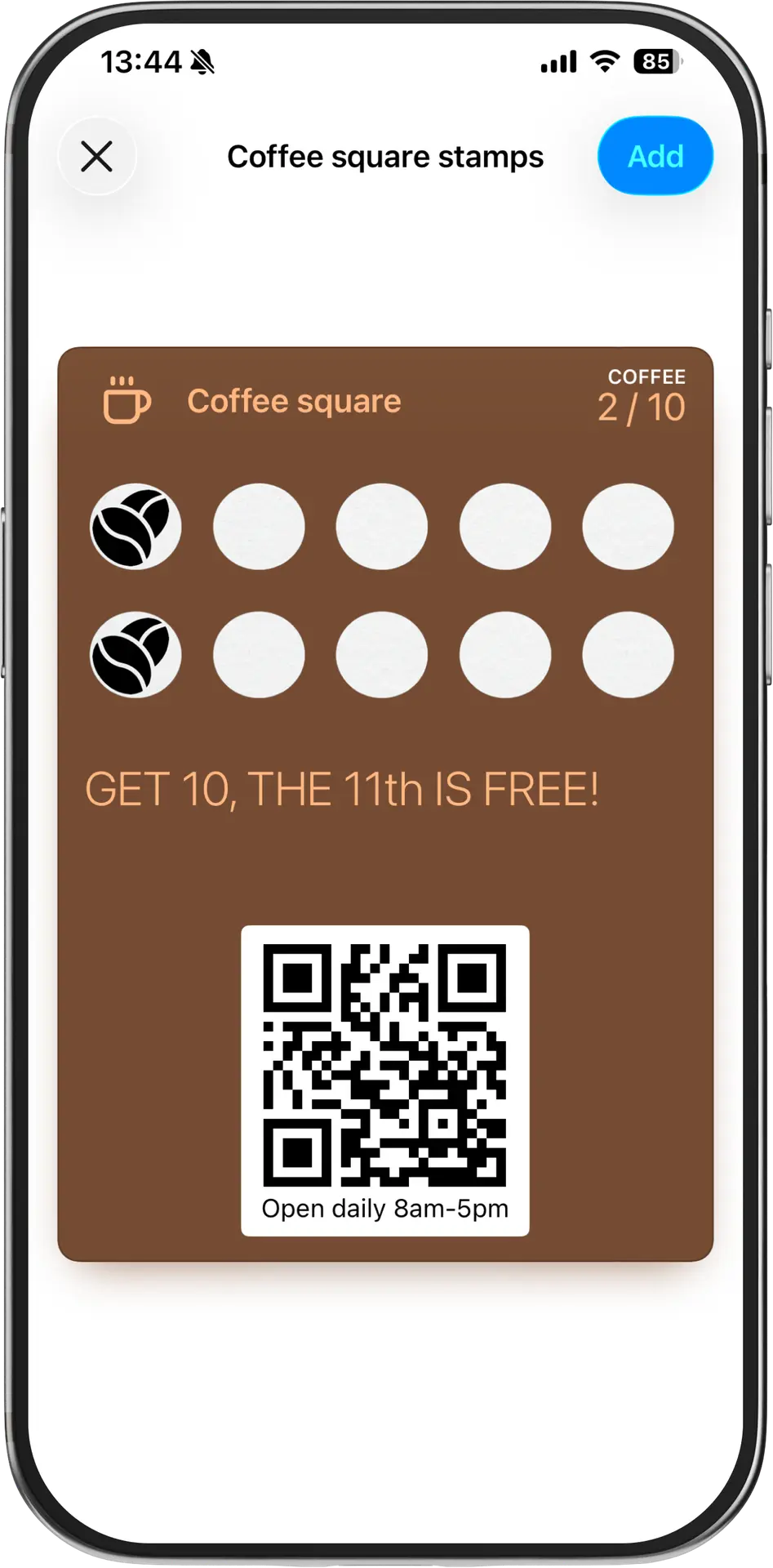
Same file, two names. From here on, we'll mostly say "card" — but if you came here searching "apple wallet pass," you're in the right place. This page is about the iPhone side of the story. Google Wallet works differently in a few ways that matter, and that's a separate page.
What follows is what an Apple Wallet card does on a customer's phone, what it costs you to set one up, and where the limits are.
What an Apple Wallet card looks like on an iPhone.
Picture a customer at your counter. They scan a QR code with their iPhone camera. A card appears — your logo, your shop name, your colours — with a button at the bottom that says Add to Apple Wallet. They tap it.
That's it. No app store. No account. No password. The card is now in their Wallet, sitting alongside their boarding passes, their concert tickets, and their Starbucks card.
A few hours later, they're walking past your shop. Their phone lights up. Right there on the lock screen, just below the time: your shop's name and a small line of text — "Welcome back. You're three stamps from a free coffee." They tap it. The card opens. They walk in.
That's the iPhone experience in one paragraph. The rest of this page covers the mechanics behind it, and the limits.
The four things Apple Wallet does that a paper card can't.
1. It's on the lock screen when it matters.
When a customer walks within roughly 100 metres of your shop, their iPhone can show a shortcut to your card on the lock screen. No notification sound. No banner from the sky. Just a small, polite suggestion: here's that card you'd probably want right now. Apple's own docs call this "passive" — it's a shortcut, not an interruption. Which is also why customers don't turn it off.
You can set up to 10 locations per card. If you have one shop, that's nine more than you need. If you have a small chain, list every location and the card adapts to whichever one the customer is near.
You also get to customise the line of text per location. The card near your Mitte branch can say something different from the card near your Kreuzberg branch. Most platforms don't make this obvious. We do.
2. It updates itself.
Customer gets a stamp. The card updates. The number on their phone changes — not the next time they open it, not when they remember to refresh — automatically, in the background.
If you want, Apple will also push a notification when the update happens. "You now have 8 stamps. Two more to go." That goes to the lock screen with a sound, just like a text message. The customer didn't install an app. They just have a card. But you can still reach them.
3. You can't spam people, and that's how it stays useful.
Apple is strict about what counts as a legitimate update. You can push a notification when the data on the card changes — a new stamp, a new balance, an offer added. You can't blast every customer with a "Happy Wednesday, 20% off everything" message just because you feel like it.
If you try to abuse this, Apple will quietly throttle your notifications. Your customers won't see them. You won't even know.
So yes, you can talk to your customers through the card. Carefully. With reason. The way you'd talk to a regular who walked in.
This is one reason Apple Wallet cards work where SMS marketing dies. Customers don't get pummelled, so they don't turn it off.
4. It never gets lost.
A paper card can be washed, forgotten in a coat pocket, fall behind a sofa, or just become illegible at stamp four. A card in Apple Wallet is on a device the customer never leaves the house without. We've never had a customer tell us they "lost" their phone the way they lose their wallet.
If they change phones, the card moves with them through iCloud. If they lose their phone, the card comes back when they restore. We don't have to do anything for that to work — Apple handles it.
What it looks like for the shop owner.
A customer adds your card. From your dashboard, you see they exist. Not their name, not their phone number — just a number going up. (More on the privacy bit below; it matters in the EU.)
When they come in next, you scan their card with the phone you already own. One tap, one stamp. The card on their phone updates before they leave the counter.
That's the entire daily workflow. The setup workflow — designing the card, picking the type, writing the lock screen messages — takes about five minutes the first time and zero minutes from then on.
There is no terminal to buy. No POS integration to wait for. No staff training that takes more than a sentence. We've watched a bakery owner do their first stamp with their reading glasses still on her head.
Card types that work in Apple Wallet.
Three formats. They look almost identical in the Wallet app, but they do different things.
Stamp cards
The classic. Buy nine coffees, get the tenth free. Apple Wallet handles this cleanly — the stamps appear visually on the card, the counter updates in real time, and the lock screen prompt nudges customers when they're nearby.
Best for: cafés, bakeries, fast food, barbershops, anyone selling something a customer buys repeatedly. If the median customer comes back within three weeks, a stamp card will probably print money.
Coupon cards
A one-shot offer that lives in the Wallet until it's redeemed or expires. 20% off your next visit. Valid until 31 March.
Apple Wallet's lock screen suggestion makes coupons unusually effective compared to email or SMS. A customer walks past your shop, the coupon surfaces, they remember the offer exists. Email coupons get deleted unread. A Wallet coupon sits there politely until it's used.
Best for: salons running a slow-month promotion, new shops trying to pull in first-time customers, anyone with a seasonal push.
Gift cards
Pre-loaded balance, redeemable in your shop. Customer A buys it for €30, sends it to Customer B, Customer B adds it to their Apple Wallet, walks in, hands you the phone, you scan, balance decreases.
The Apple Wallet–specific bit: the balance auto-updates after each visit. Customer B doesn't have to wonder how much is left. They open the card, the number is current. You don't get the "is there still anything on this?" question at the counter.
Best for: salons, massage studios, restaurants, anyone whose customers buy as gifts. December is the obvious moment. The less obvious one is birthdays — a Wallet gift card sent by iMessage at 9am beats a card in the post by a week.
Limits.
- iPhones only. Half your customers might be on Android. They'll need a Google Wallet card instead — same idea, slightly different mechanics. We do both. But if you somehow only set up Apple Wallet, you'll be missing roughly half the market.
- The lock screen prompt isn't a billboard. It's small. It's polite. It will not save a shop that nobody walks past. The geofence is the whisper, not the shout.
- Push notifications need a real reason. As above — you can't blast marketing. If your strategy depends on weekly broadcast offers, this isn't the right channel for that part of it.
- No NFC tap-to-pay magic. Customers don't pay with the card. They show it. You scan it. The card is a loyalty card, not a payment card.
- Lock screen suggestions need location services on. Some customers turn them off. They still get the card; they just don't get the nudge when nearby. The card still updates and the push notifications still work.
Privacy and GDPR (because we're in Berlin and our lawyer made us).
A customer adds your card. We do not collect their name, their email, their phone number, or their face. We don't know who they are. You don't know who they are.
What you get is a number that goes up each time someone uses the card. You can see how many customers have a card, how many stamps were collected this week, and how many rewards were redeemed. You don't see who.
This is a deliberate design choice. It means you don't have a GDPR liability for a customer list you didn't need in the first place. If you want to ask customers for their email when they redeem a reward, you can — but that's a separate choice you make, with a separate consent box. We don't do it by default.
EU hosting. German support. The boring stuff is in order.
How much it costs.
Free trial: two months on us. Use code START2 at signup.
After that: paid plans starting at a price that's less than what a café spends on coffee beans in a day. Pricing is on our pricing page — we don't hide it.
You can cancel any time. We don't ship a tablet to your shop, so there's nothing for you to send back.
Set it up.
Try the demo — adds a sample card to your own Apple Wallet in ten seconds, so you can see what your customers would see.
Or start your free trial and have a real card live in about five minutes.
If you'd rather watch someone else do it first, the demo above shows you the customer side. If you'd rather just ask a question, the team is on email and replies the same day.
Questions people ask.
Straight answers, no marketing fluff.
Try a live card on your own phone: lovelylocal.place/demo. Two months free with code START2.